Tech stack: .NET 8 / .NET 10 · C# · HL7 FHIR R4 · Firely SDK · Serilog
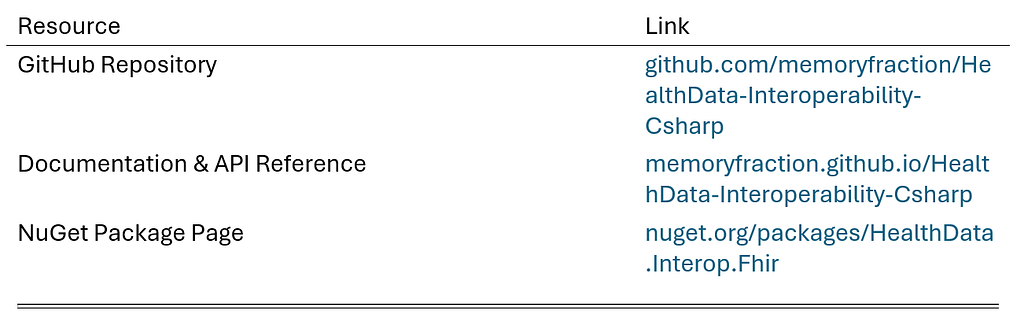
NuGet package: HealthData.Interop.Fhir v1.3.2
GitHub Repo: github.com/memoryfraction/HealthData-Interoperability-Csharp
Documentation & API Reference: memoryfraction.github.io/HealthData-Interoperability-Csharp
Building FHIR interoperability? I made a free checklist of the 12 pitfalls teams hit before Cures Act certification.
1. The Problem I Kept Seeing (and Solving)
1.1 The Reinventing-the-Wheel Trap in Healthcare IT
If you have ever worked on healthcare interoperability projects, you know the pain:
You spend two weeks building a FHIR client that can search patients by name, validate resources against HL7 rules, and map legacy CSV data to FHIR Patient resources.
Six months later, another project comes along. Same requirements. Different client. And somehow, you are copying code from an old repo, hoping nothing breaks.
This is especially vicious in healthcare IT because the stakes are higher than most software domains:
Problem 1 — FHIR is massive. The HL7 FHIR R4 specification has thousands of pages. No one memorizes it. Every developer who starts from scratch repeats the same mistakes.
Problem 2 — HIPAA compliance is not optional. One logging mistake can expose PHI (Protected Health Information). A single unmasked SSN sitting in your application logs can put your organization on the wrong side of the HIPAA Security Rule — and trigger real penalties.
Problem 3 — US Core profiles are federal requirements. The ONC (g)(10) rule mandates certified EHR systems conform to specific FHIR profiles. If your Patient resources do not match, your integration fails certification.
Problem 4 — Legacy data migration is tedious and error-prone. Mapping a messy CSV full of “M”, “Male”, “m”, “MALE” into FHIR’s clean AdministrativeGender enum should not take three days.
1.2 The Realization After Seven Articles
Over the past seven months, I published a series documenting my learning journey from scratch:
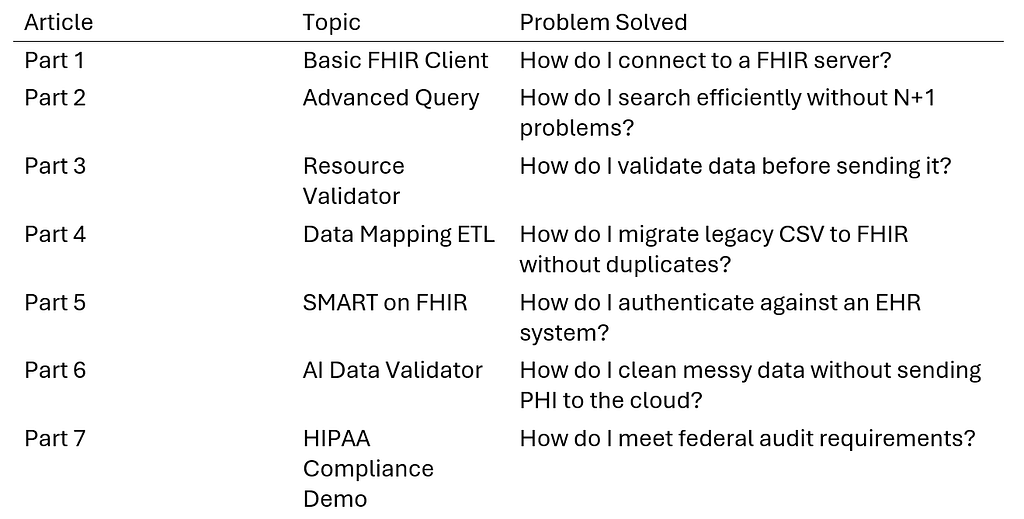
Along the way, I noticed a pattern: every module reused the same building blocks.
· FHIR client utilities? Shared across modules 1 through 5.
· Gender normalization? Used in modules 4 and 6.
· PHI masking before logging? Critical for modules 6 and 7.
· Audit logging with SHA-256 chains? Required by module 7, useful everywhere.
So I extracted them into a single NuGet package.
That is what this article is about.
2. What Is This Package?
2.1 HealthData.Interop.Fhir at a Glance
HealthData.Interop.Fhir is a production-grade .NET 8 library for healthcare data interoperability. Think of it as the swiss army knife for FHIR developers in C#.
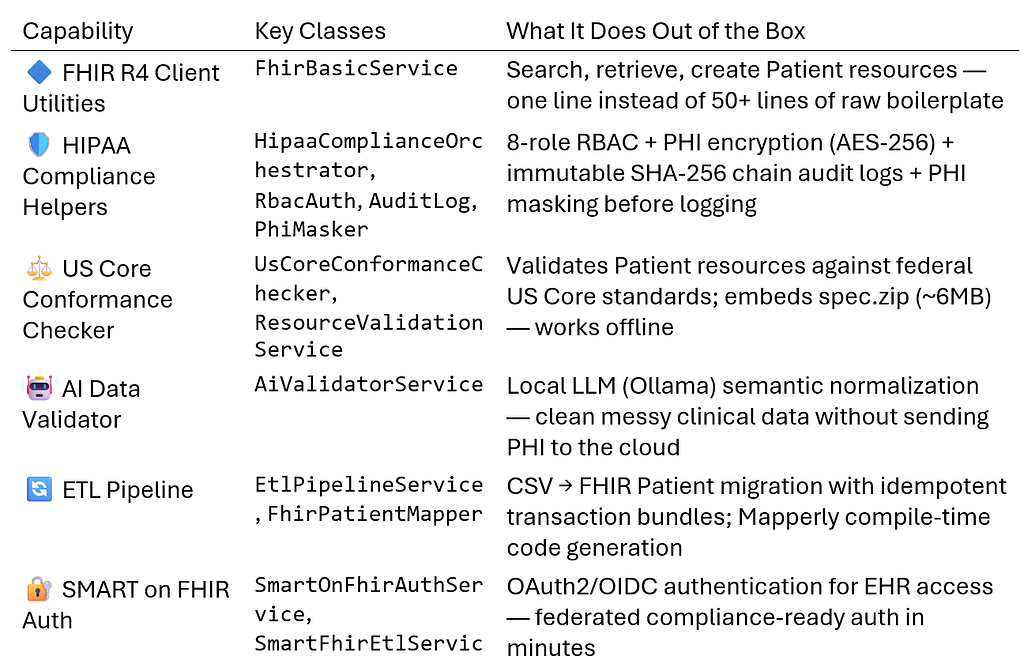
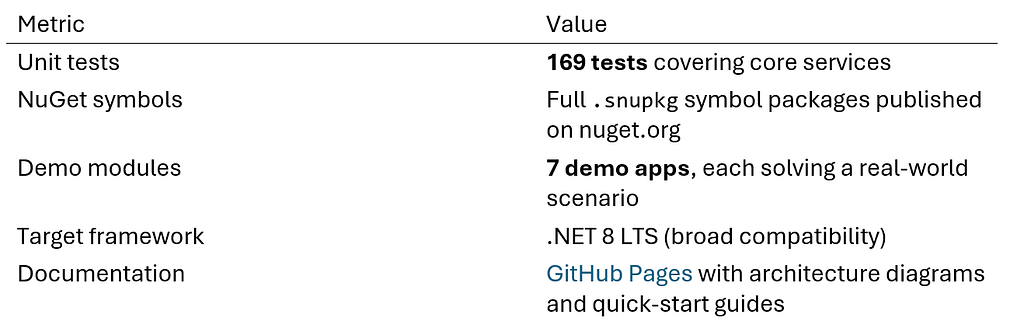
2.2 Quality Indicators
3. A Real Scenario: Hospital Legacy Data Migration
3.1 The Situation
A mid-size hospital system needs to migrate 50,000 patient records from an old SQL Server database into a modern FHIR-based EHR platform. Here is what the legacy CSV data looks like (synthetic test data):
Id,FirstName,LastName,Gender,BirthDate,Phone
TEST-001,Test-Alpha,Patient-One,Male,1990-01-01,555-000-0001
TEST-002,Demo-Beta,Patient-Two,Female,1985-01-01,555-000-0002
TEST-003,Synthetic-Gamma,Patient-Three,Other,2000-01-01,555-000-0003
Notice the problems:
1. Gender values are inconsistent — “Male”, “Female”, “Other” need to map to AdministrativeGender enum with strict casing
2. Birth dates may be missing or use different formats — some systems use slashes, some use dashes, some leave blanks
3. Phone numbers use different formatting conventions — parentheses, dots, hyphens all mixed together
4. No FHIR structure at all — just raw data in a flat file
The hospital also has three non-negotiable requirements:
· Requirement A: Validate every record is structurally correct before sending it to the FHIR server
· Requirement B: Ensure HIPAA compliance — audit who accessed what, encrypt PHI fields, mask PHI before logging
· Requirement C: Prevent duplicates — if the migration script crashes halfway through and restarts, records must not be created twice
3.2 Before: Building Everything From Scratch
Without this library, a developer typically writes something like this:
Step 1 — HTTP Client Setup (~30 lines)
var handler = new SocketsHttpHandler();
handler.SslOptions.RemoteCertificateValidationCallback = ...;
var httpClient = new HttpClient(handler);
Step 2 — FHIR Client Configuration (~15 lines)
var settings = new FhirClientSettings { PreferredFormat = ResourceFormat.Json };
var fhirClient = new FhirClient("https://your-fhir-server.com/baseR4", httpClient, settings);
Step 3 — CSV Reading and Manual Mapping (~80+ lines)
using var reader = new StreamReader(csvFile);
using var csv = new CsvReader(reader, CultureInfo.InvariantCulture);
var records = csv.GetRecords<LegacyPatient>().ToList();

foreach (var record in records)
{
    // Gender normalization — manually handle every variant
    string gender;
    switch (record.Gender.ToLower())
    {
        case "male": case "m": gender = "male"; break;
        case "female": case "f": gender = "female"; break;
        default: gender = "unknown"; break;
    }

    // Build FHIR Patient resource — every field manually mapped
    var patient = new Patient
    {
        Identifier = new[] { new Identifier { Value = record.LegacyPatientID } },
        Name = new[] { new HumanName { Given = new[] { record.FirstName }, Family = record.LastName } },
        Gender = Enum.Parse<AdministrativeGender>(gender, true),
        BirthDate = !string.IsNullOrEmpty(record.BirthDate)
            ? DateTime.ParseExact(record.BirthDate, "yyyy-MM-dd", CultureInfo.InvariantCulture)
            : (DateTime?)null
    };

    // Validate — you'd need to add Firely SDK yourself (~50+ lines of setup)
    // Create with transaction bundle for idempotency (~20 lines)
    // Log the operation — but wait, HIPAA says mask PHI first! (~30 lines)
}
Step 4 — RBAC / Access Control (~100+ lines)
You would need to either build your own role-based access control system or find a third-party library. Then wire it up.
Step 5 — Immutable Audit Logging (~80 lines)
SHA-256 hash chaining for tamper-evident audit logs does not come free. You write it yourself.
Step 6 — PHI Encryption Helper (~40 lines)
AES-256 encryption utilities need to be written, tested, and integrated.
Total: roughly 350–400 lines of boilerplate just to get started. And that is before handling edge cases, error recovery, retry logic, and actual business-specific logic.
3.3 After: Using HealthData.Interop.Fhir
Here is the same workflow using the library — with the exact API signatures from the actual codebase:
using Hl7.Fhir.Rest;
using HealthDataInteropSharedLibrary.Etl;
using HealthDataInteropSharedLibrary.Shared;
using HealthDataInteropSharedLibrary.Compliance;
using HealthDataInteropSharedLibrary.ResourceValidator;

// ============================================
// Step 1: Initialize the ETL pipeline (~5 lines)
// ============================================
var fhirClient = new FhirClient("https://your-fhir-server.com/baseR4");
var mapper = new FhirPatientMapper(); // handles gender normalization, phone formatting, etc.
var etlService = new EtlPipelineService(fhirClient, mapper);

// ============================================
// Step 2: Run the full migration (~3 lines)
// Extract CSV → Transform to FHIR → Load via Transaction Bundle
// ============================================
var (created, updated) = await etlService.RunAsync(@"C:datalegacy_patients.csv");
Console.WriteLine($"ETL complete. Created: {created}, Updated: {updated}.");

// ============================================
// Step 3: HIPAA-aware PHI access check (~5 lines)
// ============================================
var orchestrator = new HipaaComplianceOrchestrator();
var result = orchestrator.ExecutePhiAccessRequest(
    userId: "user123",
    role: FhirUserRole.Physician,   // 8 roles: SysAdmin, Physician, Nurse, FrontDesk, Biller, Insurance, Patient, Auditor
    ipAddress: "192.168.1.100",
    patientId: "TEST-001",
    accessPurpose: "TREATMENT");

Console.WriteLine(result ? "Access granted — audit trail updated" : "Access denied");

// ============================================
// Step 4: Mask PHI before writing to logs (~1 line)
// ============================================
var safeLog = PhiMasker.SafeLog(patient.ToJson()); // SSN, phone, etc. replaced with ***
logger.LogInformation(safeLog); // No PHI in your logs!
Total: roughly 20 lines of clean, readable code.
4. The Numbers: Before vs. After
4.1 Efficiency Comparison Table
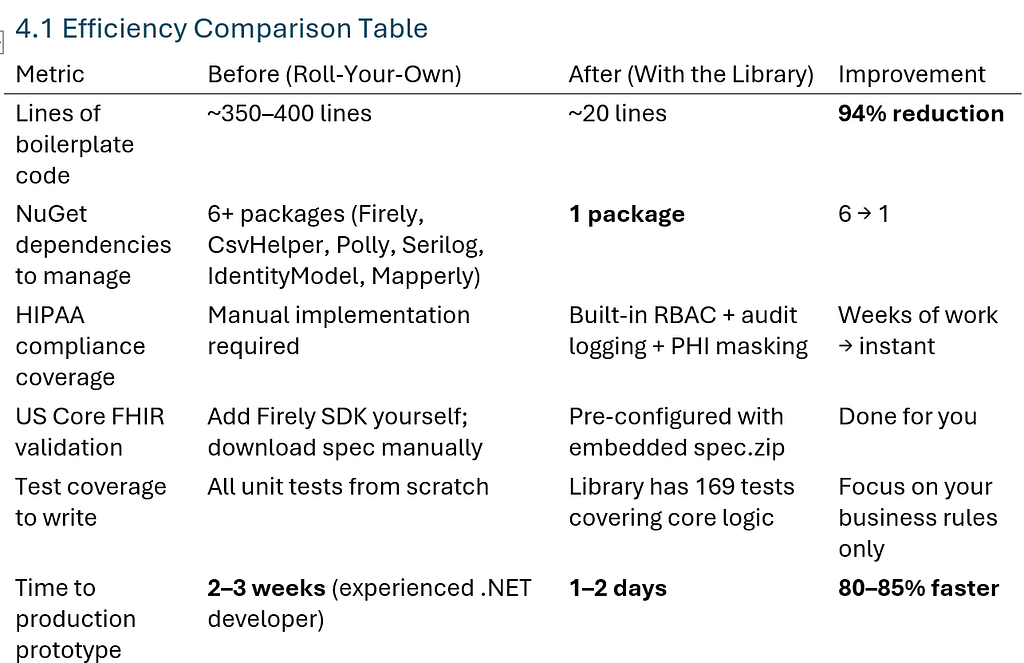
4.2 What That Means in Business Terms
A healthcare IT consulting firm charges $150–$300/hour for a senior .NET developer. Reducing a 2-week effort to 2 days means:
Traditional approach: 10 days × 8 hours × $225 = ~$18,000
With this library: 2 days × 8 hours × $225 = ~$3,600
Time saved for your team: ~$14,400 per project
That is the difference between a project that barely breaks even and one with healthy margins — all by not reinventing infrastructure code.
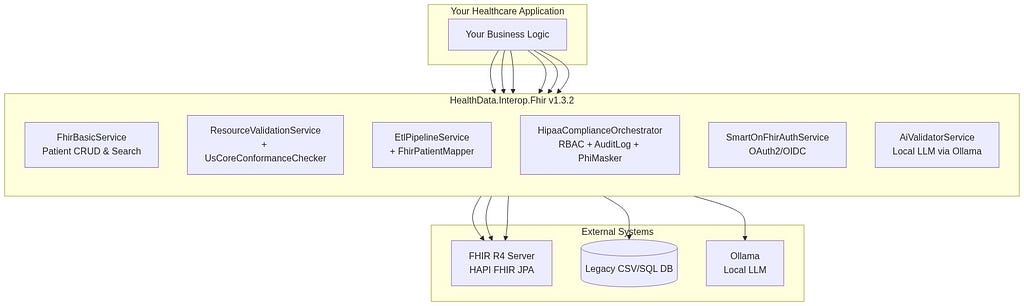
5. Architecture Overview
5.1 System Architecture Diagram
5.2 Modular Design: Use What You Need
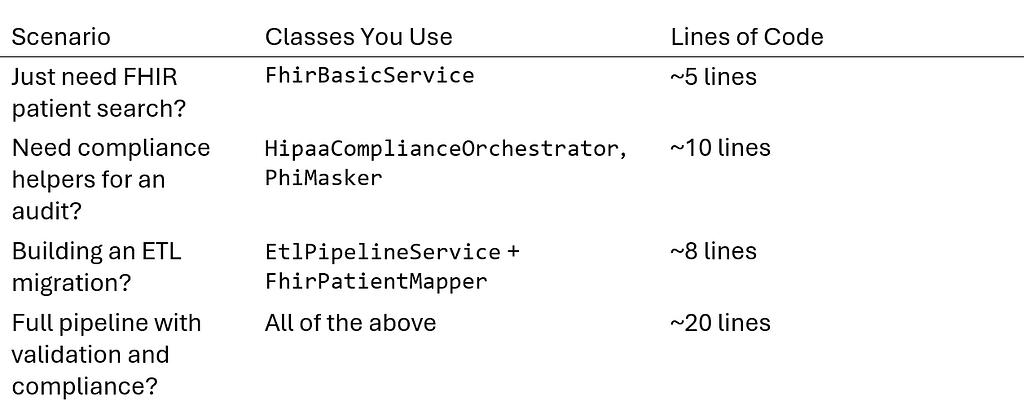
The beauty of this architecture is that you only reference the pieces you need:
6. Installation & Quick Start
6.1 Install the Package
# Via .NET CLI (recommended)
dotnet add package HealthData.Interop.Fhir

# Via Package Manager Console (Visual Studio)
Install-Package HealthData.Interop.Fhir
6.2 Minimal Working Example: Search Patients by Name
using HealthDataInteropSharedLibrary.BasicClient;

var fhirService = new FhirBasicService("https://hapi.fhir.org/baseR4");
var patients = await fhirService.SearchPatientsByNameAsync("John");

foreach (var patient in patients)
{
    Console.WriteLine(FhirBasicService.FormatPatientName(patient));
}
Note: the NuGet package id is HealthData.Interop.Fhir; the root namespace is HealthDataInteropSharedLibrary.
That is it. A working FHIR patient search client in 5 lines of code.
6.3 Full ETL Pipeline Example: Legacy CSV → FHIR Server
using Hl7.Fhir.Rest;
using HealthDataInteropSharedLibrary.Etl;
using HealthDataInteropSharedLibrary.Shared;

// Wire up the pipeline
var fhirClient = new FhirClient("https://your-fhir-server.com/baseR4");
var mapper = new FhirPatientMapper();
var etlService = new EtlPipelineService(fhirClient, mapper);

// Run it — extracts CSV, transforms to FHIR patients, loads via transaction bundle
var (created, updated) = await etlService.RunAsync(@"C:legacy-datapatients.csv");

Console.WriteLine($"Processed: created={created}, updated={updated}");
The FhirPatientMapper handles all the tedious mapping automatically:
· Gender normalization (“Male” → AdministrativeGender.Male)
· Phone formatting and ContactPoint structure
· Birth date parsing with multiple format support
· Idempotent Conditional PUT to prevent duplicates during retries
7. Why I Built This (And Why You Should Use It)
7. Why I Built This (And Why You Should Use It)
7.1 The Honest Story
Months ago, I started learning FHIR interoperability from scratch.
Every article in this series documents a real problem I hit and the solution
I built for it.
Along the way, one thing became obvious: every module kept reusing the same building blocks — FHIR client utilities, validation logic, gender
normalization, PHI masking, audit logging. Instead of copying code between modules, I extracted them into a single shared library.
So instead of starting from a blank file, you can start from patterns that are
already structured, documented, and covered by 169 unit tests — and spend your time on the part that’s actually unique to your project.
7.2 What This Is (and Is Not)
What this IS:
· A well-tested reference implementation of healthcare interoperability patterns
· A time-saver for .NET developers working on FHIR projects
· A portfolio project from someone with 10+ years building .NET/C# systems — 9 of them in US production — now focused on healthcare data standards
What this is NOT:
· A commercial product with support SLAs — it’s an open-source portfolio project
· A substitute for your own compliance review — HIPAA compliance is
organizational, not something a library confers; always involve your
legal/compliance counsel
· A complete EHR system — it’s the plumbing, not the building
· Battle-tested in a live PHI environment — the patterns are modeled on
production requirements and validated against synthetic data, not yet run in a real clinical deployment. I’m iterating in public; if you put it somewhere real, tell me what breaks.
8. How This Helps Your Career (and Your Projects)
8.1 For Individual Developers
Using this package in your own projects means:
1. You get well-tested, production-minded patterns without spending weeks learning FHIR internals
2. Your code is cleaner and more maintainable — less boilerplate, more business logic
3. You have audit-ready compliance helpers already wired up
4. You can focus on the unique parts of your healthcare application
8.2 For Team Leads and Architects
1. Faster onboarding for junior developers working on FHIR projects
2. Consistent patterns across microservices in a healthcare platform
3. Built-in test coverage (169 unit tests) means less QA overhead
4. Single dependency point — when the package updates, everyone benefits
9. What Comes Next?
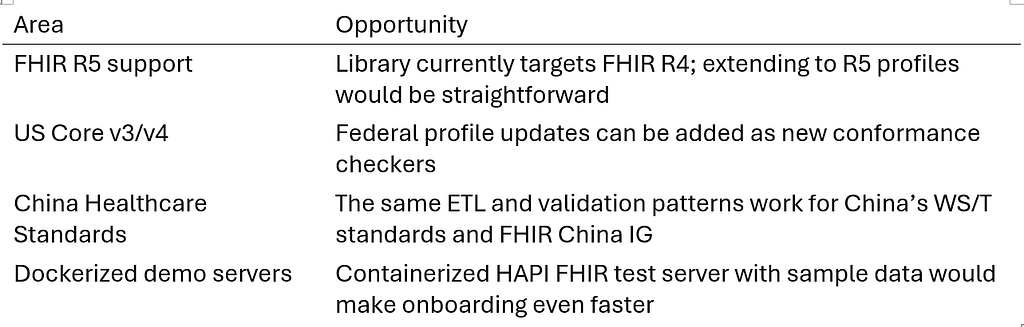
9.1 Extensibility Roadmap
The codebase is designed for extensibility. Here are areas where you could contribute or build on top:
9.2 Resources
10. The Bottom Line
10.1 One Library, One Goal
Healthcare interoperability is hard. It should not take two weeks to write code that connects a .NET application to a FHIR server, validates patient data, handles HIPAA-aware audit logging, and migrates legacy records.
One line of code should get you most of the way there.
That is what HealthData.Interop.Fhir is for. Install it. Use it. Focus your energy on the unique healthcare problems that actually need solving — not on boilerplate infrastructure code.
10.2 Contact & Collaboration
Rong (Rex) Fan — .NET/C# Architect | Healthcare Data Interoperability (FHIR/HL7) | AI-Powered Clinical Systems
· LinkedIn: linkedin.com/in/rongfan1031
· Medium Series: medium.com/@rex.fan18
· Focus: High-performance, compliant healthcare systems built on .NET
⚠️ Disclaimer repeated for emphasis: All patient data used in this article and the associated code repository is synthetic test data. It does not contain any real PHI. Code examples are educational. Consult legal counsel before production deployment of compliance-related code.
This article is Part 8 of the “.NET & C# for FHIR Interoperability” series. Previous articles cover basic client setup, advanced querying, resource validation, ETL pipelines, SMART on FHIR authentication, AI-driven data normalization, and HIPAA compliance frameworks.
Get the free X12 ↔ FHIR Field Checklist (PDF) and a note when I ship something new. Get the checklist.